Step 2: Advanced
Field: Upload File (PDF or Google Sheet)
What it does: Gives Prism reference material it can use to inform responses. Unlike Attribution sheets (Step 3), these are static context documents, not live queryable data.
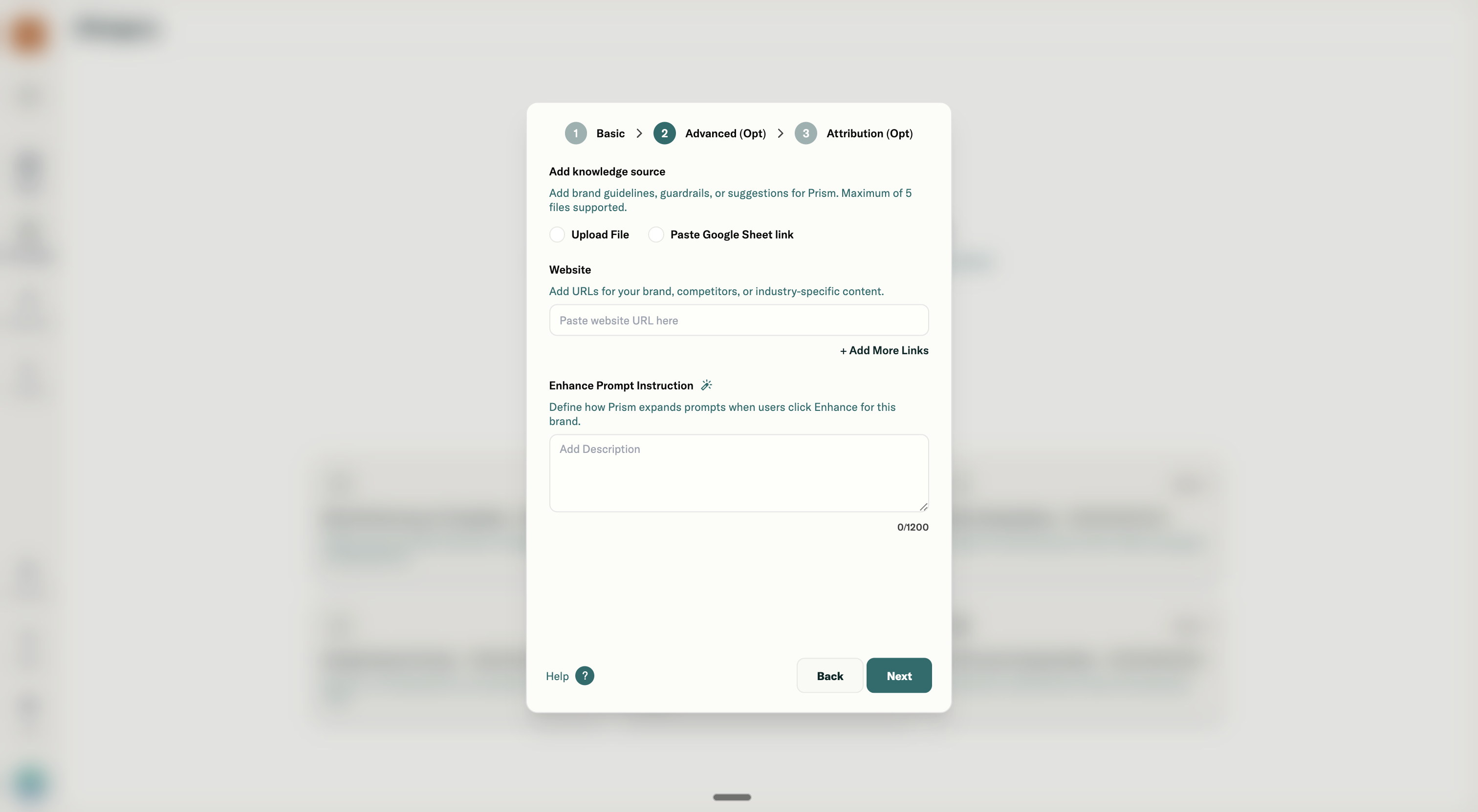
Limitation: One file type (either doc or google sheet) per knowledge object. Remove existing to upload another.
PDF use cases:
| Use Case | What to Upload |
|---|---|
| Brand guidelines | Tone of voice doc, messaging framework |
| Playbooks | Performance marketing SOPs, optimization checklist |
| Historical context | Quarterly reviews, campaign post-mortems |
| Compliance | Approval requirements, restricted claims |
Google Sheet use cases (via Prism template):
| Use Case | What to Include |
|---|---|
| KPI targets | Target ROAS, CPA ceilings, CPM benchmarks by platform |
| Campaign taxonomy | Naming conventions, campaign ID mappings |
| Audience definitions | Segment names and what they include |
| Creative specs | Platform requirements, asset naming |
Example: When to use PDF vs Google Sheet
- Use PDF for narrative guidance ("how we talk about performance")
- Use Google Sheet for structured reference data ("our target metrics")
Field: Website URL
What it does: Prism crawls the URL to enrich context. Useful for pulling in live brand information without manual uploads.
What URLs work well:
| URL Type | Use Case |
|---|---|
| Brand homepage | General brand positioning, product info |
| Product pages | Pricing, features, offers |
| Help center / FAQ | Common customer questions |
| Landing pages | Current campaign messaging |
| Company "About" page | Brand story, mission |
What URLs don't work well:
- Pages behind login
- Dynamic single-page apps with no crawlable content
- PDFs hosted online (upload directly instead)
Example use cases:
Link your pricing page so Prism can reference current offers when analyzing conversion rates.
Link your product category page so Prism understands which products belong to which campaigns.
Field: Enhance Prompt Instruction
What it does: Controls how Prism expands shorthand when users click the "Enhance Prompt" button in chat. Think of it as defining shortcuts.
Character limit: 1,200 characters (~300 words)
How it works: User types short prompt → clicks Enhance → Prism expands using these instructions.
How to write Enhance Prompt instructions:
-
Define shorthand terms When I say "top campaigns" I mean campaigns with ROAS above 4x in the last 14 days. When I say "problem campaigns" I mean campaigns with ROAS below 2x for more than 7 days.
-
Set default time ranges
Unless I specify dates, assume I'm asking about the last 7 days. "Recent" means the last 14 days. "This month" means the current calendar month.
-
Define metric shorthand "Performance" means ROAS and CPA. "Efficiency" means CPM and CTR. "Scale" means spend and impressions.
-
Map campaign nicknames "Hero campaigns" = campaigns with IDs 12345, 67890, 11223. "Evergreen" = all campaigns with "EVG" in the name.
Example full Enhance Prompt instruction:
- When I say "top performers" I mean campaigns with ROAS above 3.5x.
- "Underperformers" means ROAS below 2x for 7+ days.
- "Recent" means the last 7 days.
- When I ask for "issues," start with campaigns that dropped more than 20% WoW in ROAS. When I ask for "wins," show campaigns that improved more than 15% WoW.